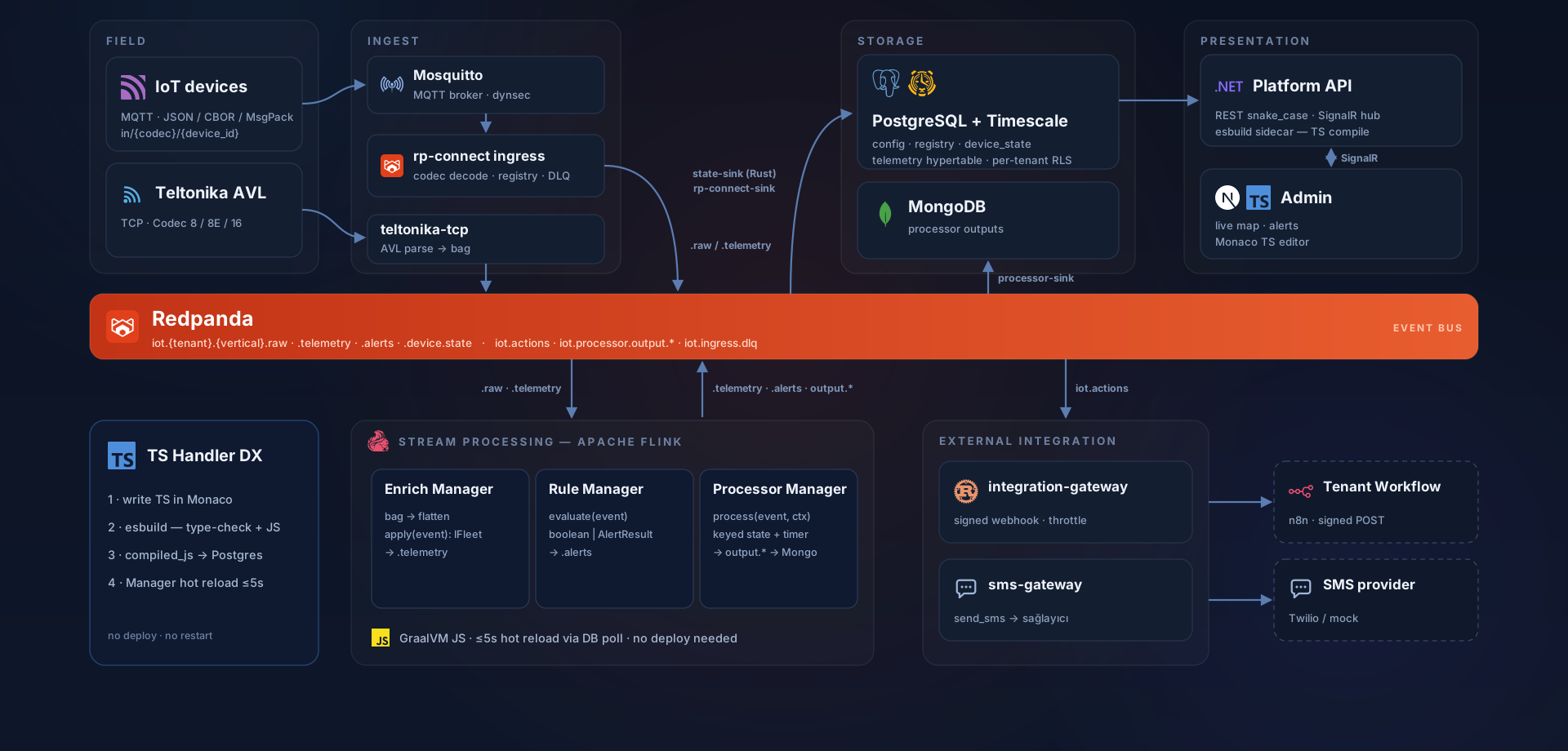
Canonical event model
One envelope: tenant, time, identifiers, processing_key and a versioned payload. After telemetry there is no such thing as a device type — everything is the same interface.
Domain-agnostic IoT platform
nodela turns the raw MQTT packet into a canonical event, runs the rules you write in TypeScript on the stream with state, and writes the result to a live map, to alerts and to your time series. Not SaaS — one Helm chart installs it into your own cluster, and the data never leaves it.
{ 1: 41.0182, 2: 29.0117, 3: 128,
  9: 1751030400, 21: "34ABC123" }
binary, integer key table
{
  "device_id": "dev-8842",
  "lat": 41.0182, "lon": 29.0117,
  "speed": 128, "ignition": true,
  "plate": "34 ABC 123",
  "driver": "M. Yılmaz"
}
slot aliases resolved
How it works
Every stop is a contract. Replace anything in between; the envelope stays the same.
Devices publish straight to MQTT; JSON, CBOR and MessagePack channels are native. Teltonika TCP and HTTP get a decoding shim at the edge. A packet that cannot be decoded is not lost — it lands in the DLQ.
in/{codec}/{device_id}
Every event is written durably to Redpanda. Ordering is guaranteed by processing_key: events from the same device — or the same asset — always land on the same partition, always in order.
iot.{tenant}.{vertical}.raw
The raw bag flattens into a canonical event. Slot aliases become real field names (t1 → plate) and reference data is joined in from cache. With no enrichment defined, the event passes through untouched.
enrich-manager
Your rules run keyed and stateful on Flink. A rule returning true raises an alert; processors keep state, set timers and emit events of their own.
rule-manager · processor-manager
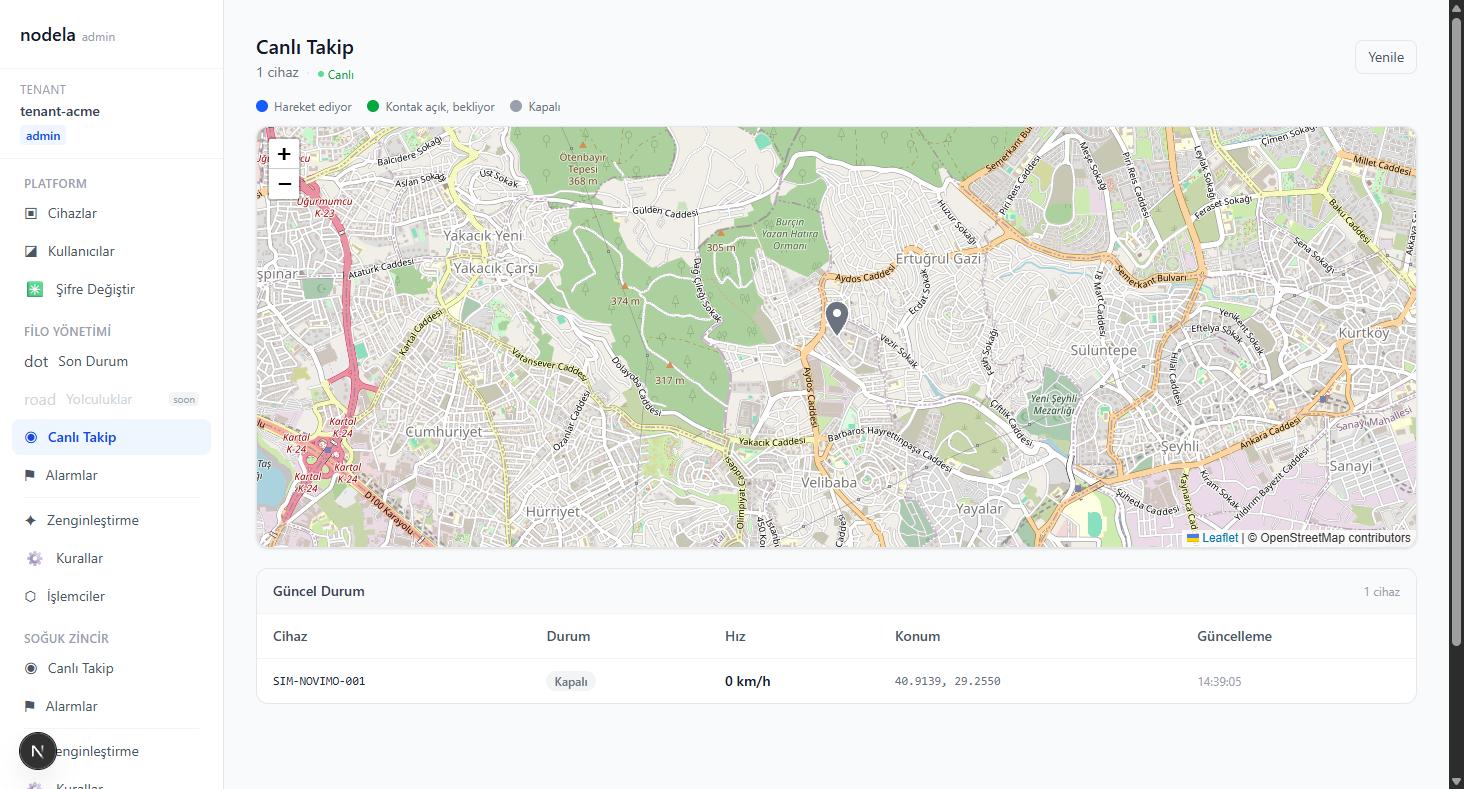
Alerts, current device state, time series and integration outputs. The console updates the map live over SignalR — no page refresh.
.alerts · device.state · timescale
Rule editor
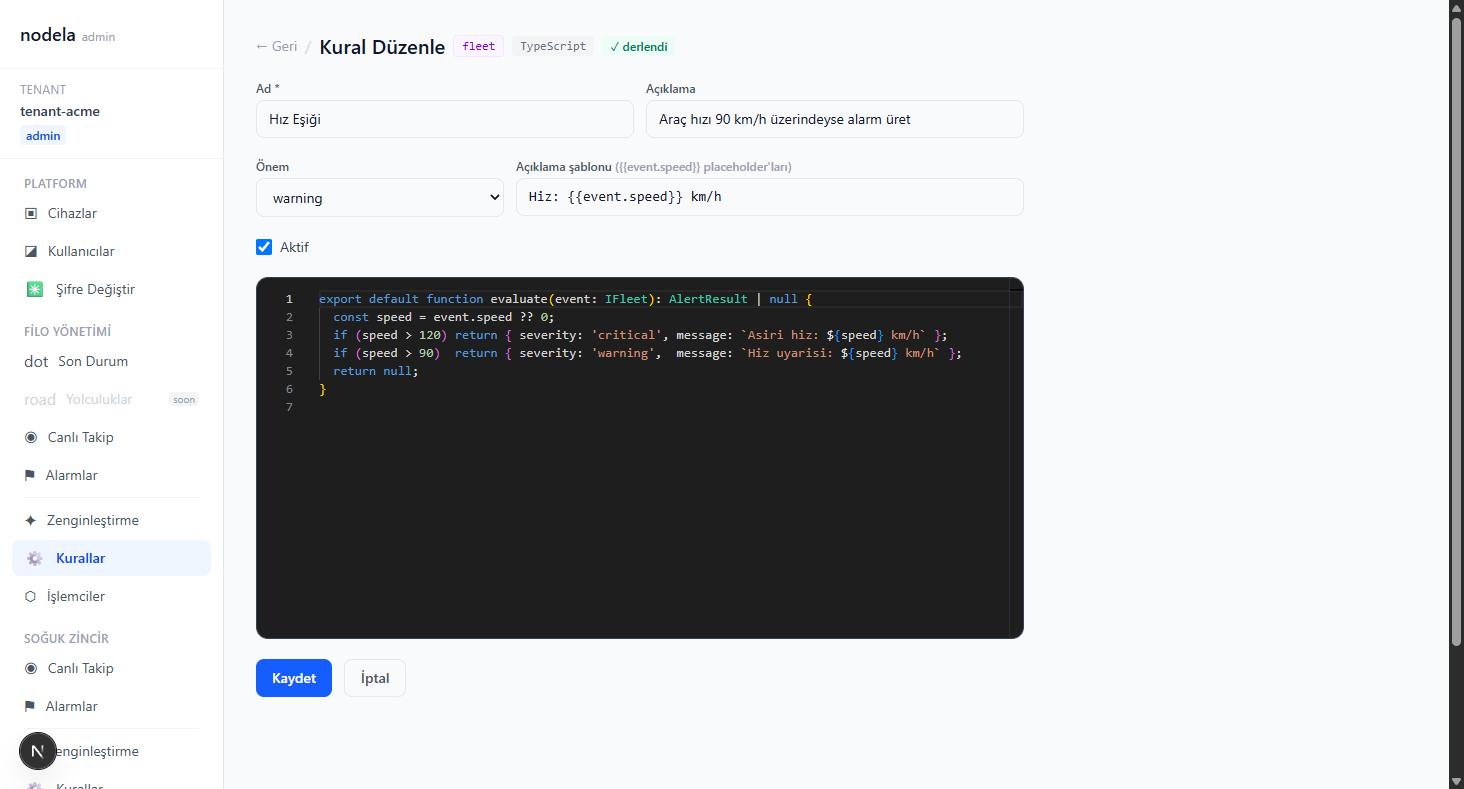
You write TypeScript in the browser. Types are generated for your tenant: if you defined an alias you write event.plate and never see a field called t1. On save the code is type-checked and errors come back line by line; if it passes, the running pipeline picks up the new version within five seconds. No restart, no deploy, no JAR.
Console
Not mockups — screenshots taken from a running installation.
Platform
The layer you rewrite on every project is finished here.
One envelope: tenant, time, identifiers, processing_key and a versioned payload. After telemetry there is no such thing as a device type — everything is the same interface.
Five text and five numeric slots inline, the rest in JSONB. You give them aliases, codegen writes the TypeScript interface for your tenant. A real type, not documentation.
Keyed state, timers you set and cancel, the watchdog pattern. Rules like 'no signal for ten minutes' do not fit into SQL; they fit here.
device_state holds the current picture and SignalR pushes changes to the console. The debounce threshold is a setting — the map is not drowned in redundant updates.
A rule can return a dynamic severity, not just a fixed threshold. Repeating alerts are deduplicated, so an operator does not see the same event a hundred times.
TimescaleDB with continuous aggregates. You do not hand-write a rollup table for an eight-hour report, and you do not chase its refresh either.
Send a command to a device over MQTT, SMS or BLE; template-based and channel-agnostic. Firmware binaries and configuration are managed separately.
Topics per tenant, types per tenant, rules per tenant. One installation, many customers — and one customer's rule never sees another's.
Verticals
A device is not locked to a vertical. It shows up on the screens that match the IO it produces; opening a new vertical is not standing up a new platform.
Position, speed, ignition, odometer, satellite count. Speeding, idling, trip start/end and geofence rules.
Temperature and humidity thresholds, door state, chain breaks. Escalating alerts based on how long and how often a threshold is breached.
Geofence entry and exit, movement and dwell, asset-to-device binding — including several devices on a single asset.
Architecture
The flow above is the summary. Below is the whole system: from broker to console, from the managers to external integrations — what each box does and which topic runs between them.
Install
Kubernetes, k3s or a single machine — it does not matter. The whole stack, from broker to console, is one Helm chart with a values file per target. The difference between the dev cluster on your laptop and production is that file.
$ helm install nodela deploy/helm/nodela -f values-prod.yamlbroker · redpanda · flink · postgres/timescale · api · console$ ./scripts/smoke.sh32/32 ✓
Running underneath
FAQ
Any device that speaks MQTT connects directly; JSON, CBOR and MessagePack channels are ready. There is a parser for Teltonika's TCP protocol. For anything else you write a small shim at the edge: decoding happens outside, and a single canonical shape stays inside the platform.
No. Rules, enrichments and processors are all TypeScript. Keyed state, ordering guarantees and timers are carried by Flink underneath; you just write a function.
Alerts and telemetry can be streamed out over webhooks and integration channels, and your own application pulls data through the query gateway. nodela does not replace your application — it puts a backbone under it.
Contact
Let us walk you through the install, the rule editor and the map with real data. Tell us briefly what you are trying to do and we will get back to you.
Your details are used only to get back to you and are never shared with third parties.